Disclosure: This article contains affiliate links. If you purchase through these links, we may earn a commission at no additional cost to you.
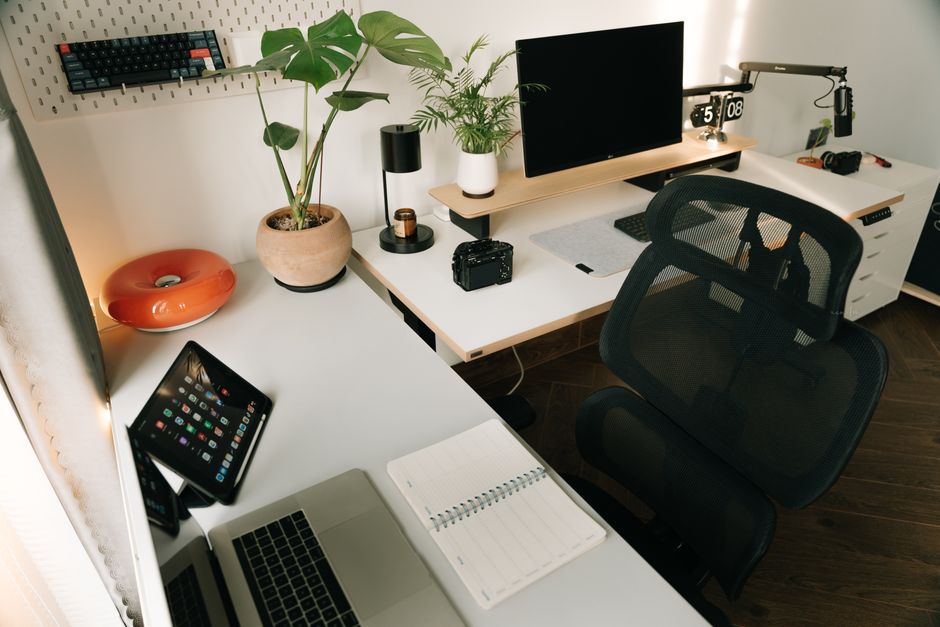
Verdict: Essential home office gear for remote professionals includes an adjustable ergonomic mesh chair, an electric dual-motor sit-stand desk, a high-resolution 27-inch or 34-inch IPS display, a noise-canceling USB headset, an asymmetric monitor light bar, and an under-desk cable management tray.
The 6 Non-Negotiable Remote Work Hardware Essentials
Working full-time from home requires moving beyond temporary dining room table arrangements. For full-time remote professionals spending 40+ hours per week at a computer, high-quality workstation hardware is not a luxury—it is essential professional equipment that directly impacts daily productivity, physical health, and career performance.
Investing in essential remote work hardware prevents chronic repetitive strain injuries, eliminates video conference call friction, and maintains deep cognitive focus. Below is an in-depth guide to the six essential hardware pillars every remote worker needs.
Remote Work Hardware Essentials Comparison Matrix
Essential Pillar
Recommended Hardware Model
Estimated Investment
Primary Workday Capability
1. Ergonomic Task Chair
Steelcase Leap V2 / SIHOO M18
Around $140 (Budget) – $500 (Refurb)
Full spinal support & 4D adjustable armrests
2. Motorized Standing Desk
FlexiSpot E7 / Uplift V2 Commercial
Around $300 – $750
Dual-motor stability with 4 memory height presets
3. High-PPI External Display
Dell UltraSharp 34″ Curved / 27″ 4K IPS
Around $220 – $650
Eye-level viewing height & high pixel density
4. Audio & Video Hardware
Jabra Evolve2 65 + Anker 2K Webcam
Around $180 – $280
Noise-canceling mic & 60 FPS video clarity
5. Eye-Care Task Light
BenQ ScreenBar Halo / Quntis Bar
Around $35 – $140
Asymmetric desktop light without screen glare
6. Cable Management Kit
Under-Desk Steel Raceway Tray & Clips
Around $25 – $40
Total concealment of power strips & charger wires
Essential 1: Commercial Ergonomic Task Seating
Your chair is the most critical health investment in your home office. Standard dining chairs and cheap unadjustable office chairs force your spine into flattened, slouched positions that cause chronic lumbar disc compression.
An essential ergonomic task chair—such as a refurbished Steelcase Leap V2 or a budget SIHOO M18—provides active lumbar support, pneumatic height adjustment, seat pan depth controls, and 4D armrests that support your forearms parallel to your desk, completely eliminating shoulder and lower back strain.
Essential 2: Electric Dual-Motor Sit-Stand Desk
A motorized sit-stand desk—such as the FlexiSpot E7 or the Uplift V2 Commercial (see our full review)—allows you to switch between sitting and standing postures with the push of a button. Look for dual-motor frames with 3-stage leg columns and digital memory height presets, providing rock-solid stability at standing heights up to 50 inches.
Essential 3: High-Resolution Display and Gas-Spring Arm
A single small laptop screen restricts multi-window workflow efficiency. Upgrade to a 27-inch 4K IPS display or a 34-inch curved ultrawide monitor (such as the Dell UltraSharp U3423WE). Mount the display on a gas-spring monitor arm (like the Ergotron LX) to position the top third of the screen at exact eye level, eliminating neck strain.
Essential 4: Professional Video Call Audio and Webcam
Clear communication is vital for remote team trust. Built-in laptop microphones and grainy 720p webcams create friction during important client presentations:
* Noise-Canceling USB Headset: The Jabra Evolve2 65 or Poly Voyager Focus 2 features noise-canceling microphone booms that filter out background household noise (barking dogs, crying children, construction) completely.
* 2K / 60 FPS Webcam: The Anker PowerConf C200 or Logitech Brio 4K provides crisp video resolution, auto-focus, and low-light exposure correction.
Essential 5: Asymmetric Monitor Task Lighting
Overhead ceiling lights cause glare on monitor screens, leading to ocular eye strain and tension headaches. Mount an asymmetric LED monitor light bar (such as the BenQ ScreenBar Halo or Quntis Light Bar) atop your display. Monitor light bars cast glare-free light across your physical desktop without reflecting off the monitor glass.
Essential 6: Under-Desk Cable Management Routing
Clean up dangling wires using a heavy-duty steel wire mesh cable management tray mounted beneath your desktop. Tuck all power strips, laptop charging bricks, and excess cable coils into the tray to maintain an elevated, sweepable floor space.
Power Infrastructure: Heavy-Duty Industrial Surge Protectors
A complete remote workstation relies on clean, stable electrical power. Protecting thousands of dollars in computer displays, laptops, and motorized standing desks requires installing an industrial metal surge protector:
* Joules Protection Rating: Select a surge protector rated at 2,000+ Joules with integrated EMI/RFI noise filtering to protect sensitive computer electronics against power spikes and lightning strikes.
* Under-Desk Mounting: Screw or clamp the power strip directly to the underside back edge of your desk, allowing all monitor and charger cords to plug in directly beneath the desk surface.
Acoustic Isolation Features for Remote Presentation Quality
For remote professionals who frequently conduct client presentations or lead team meetings, room acoustics directly impact professional credibility. Eliminate hollow room echoes by placing dense felt acoustic wall panels (such as FeltRight tiles) on the wall directly behind your microphone.
Combine wall acoustic panels with a directional cardioid USB microphone (like the Blue Yeti or Rode NT-USB) mounted on a boom arm to capture crisp, professional voice audio while rejecting background household ambient noise.
Frequently Asked Questions
What is the single most important home office essential to buy first?
If budget limits require purchasing items one at a time, prioritize an adjustable ergonomic task chair first. Protecting your lumbar spine against chronic back pain provides the highest daily health return on investment.
Is a Thunderbolt 4 docking station an essential item for remote workers?
For laptop users connecting multiple external monitors, wired ethernet, and USB peripherals, a Thunderbolt 4 docking station (such as the CalDigit TS4 or Anker 778) is an essential workflow convenience, reducing desktop wiring to a single plug.
How can I make video conference calls look professional on a tight budget?
Position your desk facing natural window light or place a warm desk light behind your webcam. Elevate your webcam to eye level and use a $40 1080p external USB webcam (like the Anker C200) instead of a low-quality laptop camera.
Do remote workers need noise-canceling headphones if they have a quiet home?
Yes. Active Noise Cancellation (ANC) headphones reduce subtle ambient household background hums (HVAC air conditioning, refrigerator compressors, outdoor traffic), significantly reducing mental auditory fatigue during long focus blocks.